Email Security

Email security
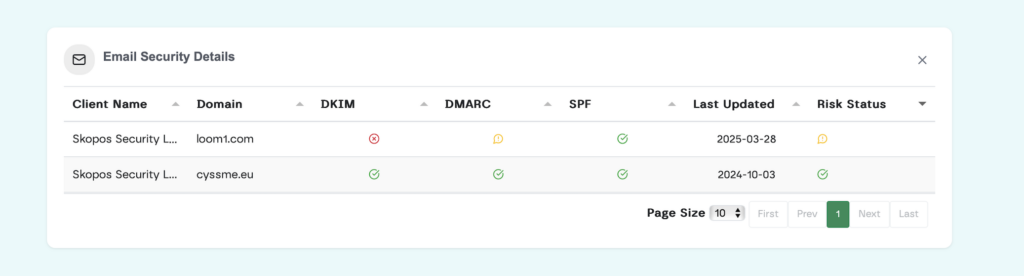
Lupasafe users can now view all client email domains, along with associated security risks, from a single interface.
Lupasafe collects and analyzes DMARC reports sent by receiving email servers globally. These reports show:
Lupasafe collects and analyzes DMARC reports sent by receiving email servers globally. These reports show:
- Which mail servers are sending messages on your client’s behalf
- Whether those messages passed or failed SPF and DKIM checks
- The volume and frequency of messages by source
- Which senders may be spoofing or impersonating your client’s domain
SPF, DKIM, DMARC status
Static compliance checks
Multi-tenant view
Fast set up + load
Easy set up
See client security by updating the DNS record with a TXT field and specific DMARC email address.
1. Add Lupasafe’s DMARC address to the domain’s DNS record (TXT type)
2. Lupasafe begins collecting DMARC XML reports sent by receiving providers (e.g., Gmail, Yahoo, Microsoft)
3. Reports are parsed and presented in the Lupasafe portal with: i) IP source, ii) Authentication status (pass/fail), ii) Domain alignment, iv) Recommendations for mitigation
The code enables checking if emails really come from the correct source. Then, via the Lupasafe portal, clients can see a report showing which emails passed the check and which didn’t. It’s like a security guard for your email.
Email security covered
- Multi-tenant dashboard: Monitor all client domains from one screen
- Passive monitoring: No mail flow interruption or re-routing required
- Prevents spoofing: Catch misuse of unprotected client domains
- Improves deliverability: Identify legitimate messages failing authentication
- Client reporting: Generate simple, branded security reports
No Credit Card Required
Awareness Training
& Security Assessments
Sign up in minutes to start learning, seeing results and automating with continuous security .
Get Started Free